PREMIUM WARDOGS CHEATS

WARDOGS Cheats & Hacks for PC – Aimbot, ESP & Radar

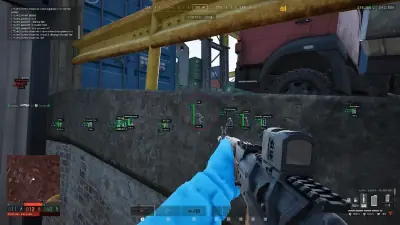
Take your WARDOGS experience further with a powerful collection of PC cheats built for tactical combat and battlefield awareness. Use customizable Aimbot settings, advanced Player ESP, and Vehicle ESP to monitor enemy positions, identify player equipment, and track vehicle activity. Explore 2D Radar, No Recoil, No Spread, and additional customization options designed to give you greater control over your gameplay.

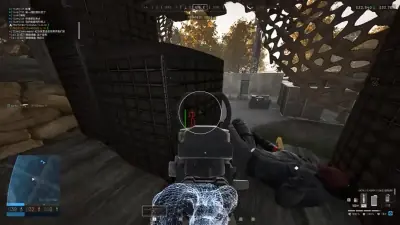
WARDOGS aiming view near cover

FOV & Smooth

Aimbot

Detailed

Player ESP

Included

Vehicle ESP

2D

Radar

Aimbot
Player ESP
Vehicle ESP
2D Radar
No Recoil
No Spread
Windows 10 & 11
WARDOGS on Steam
Aimbot
Player ESP
Vehicle ESP
2D Radar
Cloud DMA required for full functionality
Aimbot
Player ESP
Vehicle ESP
2D Radar
No Recoil
No Spread
Windows 10 & 11
WARDOGS on Steam
Aimbot
Player ESP
Vehicle ESP
2D Radar
Cloud DMA required for full functionality

Features

WARDOGS Cheat Features

Advanced WARDOGS Cheats for Better Combat Awareness & Control

Advanced Aimbot

Customizable Targeting & Precision Control

Configure your aiming experience with adjustable targeting options designed to give you greater control over target selection and tracking. Fine-tune FOV, smoothness, bone selection, and prediction while using visual indicators to monitor your active targeting settings.

  • Enable Aimbot: Activate the automated targeting system.
  • FOV: Adjust the targeting area around your crosshair.
  • Smooth: Customize how gradually the aim moves toward a selected target.
  • Bone Selection: Choose the preferred body position for targeting.
  • Visible Check: Prioritize targets that are visible.
  • Prediction: Account for target movement when tracking opponents.
  • Draw FOV: Display the active targeting radius on screen.
  • Draw Target Line: Show a visual line toward the currently selected target.
Player ESP

Detailed Enemy Tracking & Player Information

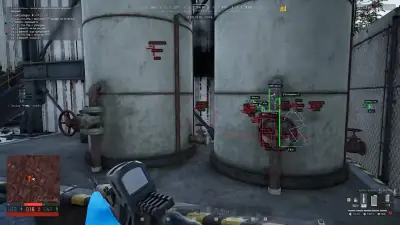
Stay informed about enemy positions with a comprehensive Player ESP system. Display important player details directly on screen, including names, health, weapons, team information, distance, and movement direction, with customizable visual indicators to help you monitor battlefield activity.

  • Box ESP: Highlight player positions with configurable bounding boxes.
  • Skeleton ESP: Display player skeletons for clearer character identification.
  • Head Circle: Add a circular indicator around player head positions.
  • Health Bar: View enemy health through on-screen health indicators.
  • Distance: Display the distance between you and other players.
  • Name ESP: Identify players through their displayed in-game names.
  • Team / Squad: View player team and squad information.
  • Weapon ESP: Identify the weapons carried by opponents.
  • View Direction: Display the direction players are facing.
  • OOF Arrows: Locate players positioned outside your current screen view.
  • Max Distance: Set the maximum range for displaying Player ESP indicators.

Vehicle ESP

Vehicle Detection, Identification & Status

Monitor vehicle activity across the WARDOGS battlefield with dedicated Vehicle ESP options. Identify vehicle positions, view their types, check distances, and distinguish between occupied and empty vehicles for better awareness of surrounding activity.

  • Vehicle ESP: Display visual indicators for vehicles around the map.
  • Vehicle Type: Identify the category or type of detected vehicles.
  • Vehicle Distance: View the distance between your position and nearby vehicles.
  • Occupied / Empty: Check whether a vehicle is currently occupied or unoccupied.

2D Radar

An Additional View of Nearby Battlefield Activity

Get a broader overview of surrounding activity with the integrated 2D Radar. Track player and vehicle markers through a separate radar interface, adjust the radar range, and monitor nearby positions without relying exclusively on your main gameplay view.

  • 2D Radar: Enable a dedicated radar interface for battlefield awareness.
  • Player Markers: Display player positions as indicators on the radar.
  • Vehicle Markers: Track vehicle positions alongside player activity.
  • Radar Range: Adjust the radar's coverage area to suit your preferences.

Miscellaneous Options

Additional Gameplay Customization & Configuration

Customize additional gameplay settings with a selection of miscellaneous options. Adjust weapon behavior, modify visual presentation, personalize your crosshair, and save or load configurations to keep your preferred settings organized.

  • No Recoil: Reduce weapon recoil for more consistent firing control.
  • No Spread: Reduce weapon spread to improve shot consistency.
  • Full Bright: Modify environmental brightness for improved visibility in darker areas.
  • Custom Crosshair: Customize your on-screen crosshair appearance.
  • Config System (Save / Load): Save your preferred settings and reload configurations whenever needed.

Store

Our products

Compare the cheat menu and the utilities on this grid. Open a product page for the feature list and checkout.

HWID Spoofer for Supported PCs

Disk serials, MAC addresses, and GPU IDs get a new pass. The cleaner in the license runs before the next sign-in.

After a hardware flag, this license rewrites disk serials. It also rewrites MAC addresses, GPU IDs, and related fingerprints. Trace cleanup is in the same license.

  • Disk serial rewrite
  • MAC rewrite
  • GPU ID rewrite

Cloud DMA

A Hyper-V environment for one Windows PC with guided installation and encrypted activation.

Cloud DMA requires GREENWARD, Static Server and AWS as separate purchases. Check the full requirements and current price at checkout.

  • Single-PC setup
  • Guided Hyper-V installation
  • Encrypted activation

Client Skin Changer for Supported Titles

Weapon skins and outfits, drawn on this PC, without a separate purchase for each cosmetic.

A small client paints premium weapon skins on your screen. Outfits and knife variants are included, across the major titles it lists.

  • Weapon finish looks
  • Outfit looks
  • Knife style looks

Why us

Read the feature list before checkout

Review the published options, setup requirements and account risks before choosing a purchase option.

  • Targeting

    Aimbot includes FOV, Smooth, Bone Selection and Visible Check.

  • Player information

    Player ESP lists boxes, skeletons, health, names, team, weapons and distance.

  • Vehicle information

    Vehicle ESP lists type, distance and occupancy.

  • Radar

    The 2D Radar can show player and vehicle markers with a configurable range.

  • Compatibility

    Steam on Windows 10 and 11. Confirm the current game build and required security settings.

  • Companion software

    Cloud DMA is separately purchased and required for full functionality on supported builds.

<24h

Patch turnaround

Usual time to ship a loader after a big WARDOGS or Elytra update.

24/7

Support

Discord help for setup, configs and account issues.

300+

Users

PC players using aimbot, ESP and tools on cheatsforwardogs.net.

Setup guide

From checkout to your first match in just three simple steps

Review checkout delivery and setup instructions before installing on a supported Windows PC.

  1. Open the portal and download the loader

  2. Launch & configure modules

  3. Verify status & launch WARDOGS

How it works

From status check to saved profile.

Four steps from the status banner to a portal profile you can load next time.

4 easy steps

  1. 01

    Check live status

    Open cheatsforwardogs.net and read the banner before you pay or start the game.

  2. 02

    Choose your product

    Pick the cheat suite, or a utility when the issue is this PC or an account limit.

  3. 03

    Launch & configure

    Download the loader from the portal, turn modules on, and set ESP and aim before a live match.

  4. 04

    Save your profile

    Save the menu profile in the portal so the next session starts from those settings.

Blog

Guides and updates

ESP and aimbot setup, menu tuning and patch-day checks for WARDOGS.

FAQ

Questions about this page

Answers about the features and requirements covered here.