
WARDOGS Cheats for Windows
Review the full feature list and Windows requirements. Cloud DMA is a separate purchase for full functionality on supported builds.
Product Overview
At a glance
Key capabilities
The short list for WARDOGS Cheats, before the full module list.
Another 26 options are in the full list below.
Overview
WARDOGS Cheats for PC
How the listed modules and the status banner fit a WARDOGS match.
How this build fits large-scale tactical combat, player tracking, vehicle awareness, customizable aim assistance, and control-zone battles.
Explore WARDOGS cheats for PC with customizable Aimbot, detailed Player ESP, Vehicle ESP, and dedicated 2D Radar features. Gain additional visibility into enemy positions, identify players through team and squad information, monitor their weapons and health, and track activity across the battlefield. Explore configurable targeting options, vehicle identification, and visual indicators designed around WARDOGS' large-scale tactical FPS gameplay.
Access additional functionality including No Recoil, No Spread, Full Bright, Custom Crosshair, and configuration profiles. Customize your visual settings, adjust targeting preferences, and explore vehicle information through dedicated ESP options. Review Windows and Cloud DMA compatibility requirements before checkout.
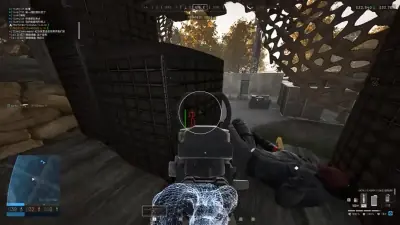
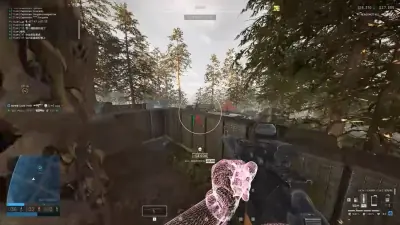
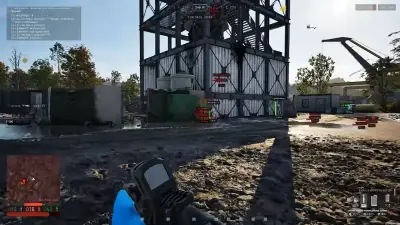
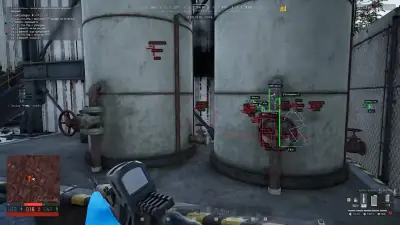
WARDOGS Cheats includes Aimbot, Player ESP, Vehicle ESP, 2D Radar, and weapon and display controls. Use the gallery to inspect the overlays in gameplay.
Aimbot and targeting
Adjust FOV, smoothing, bone selection and prediction. Visible Check, Draw FOV and Draw Target Line provide additional targeting controls and visual feedback.
Player and vehicle information
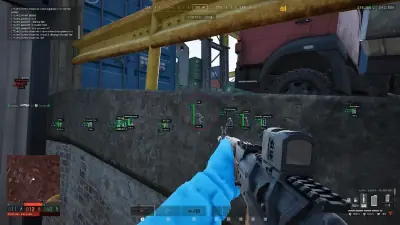
Player ESP can show boxes, skeletons, health, names, weapons, team or squad, distance and view direction. Vehicle ESP shows vehicle type, distance and occupancy. Radar places player and vehicle markers in a separate view.
Configuration and compatibility
No Recoil, No Spread, Full Bright, Custom Crosshair and saved configurations are listed options. The product is listed for the Steam version of WARDOGS on Windows 10 and 11. HVCI, Core Isolation, TPM and Secure Boot are required. Cloud DMA is required for full functionality on supported builds and is a separate purchase.
Before checkout
Check the current game build, supported setup and available access terms at the destination checkout. Third-party software can stop working after updates and can lead to account penalties under game rules.
Modules
What's included
The full option list for WARDOGS Cheats. Each line can be switched in the menu.
- Enable Aimbot
- FOV
- Smooth
- Bone Selection
- Visible Check
- Prediction
- Draw FOV
- Draw Target Line
- Box ESP
- Skeleton ESP
- Head Circle
- Health Bar
- Distance
- Name ESP
- Team / Squad
- Weapon ESP
- View Direction
- OOF Arrows
- Max Distance
- Vehicle ESP
- Vehicle Type
- Vehicle Distance
- Occupied / Empty
- 2D Radar
- Player Markers
- Vehicle Markers
- Radar Range
- No Recoil
- No Spread
- Full Bright
- Custom Crosshair
- Config System (Save / Load)
Experience
Menu layers · After checkout
The screenshots above show WARDOGS gameplay overlays. Review each feature and its requirements below.
In-game layers
- Layer A
Aim overlay
WARDOGS aiming view near cover
- Layer B
Combat view
WARDOGS aiming view across a wooded lane
- Layer C
Player ESP
WARDOGS Player ESP around a control-zone building
- Layer D
Vehicle awareness
WARDOGS Player ESP near industrial tanks
- Layer E
Radar view
WARDOGS radar and player markers near vehicles
More products
Pairs well with
Utilities sold beside the cheat. Each one keeps a separate page.
- HWID Spoofer After a hardware flag, this license rewrites disk serials. It also rewrites MAC addresses, GPU IDs, and related fingerprints. Trace cleanup is in the same license. View details: HWID Spoofer
- Cloud DMA Cloud DMA requires GREENWARD, Static Server and AWS as separate purchases. Check the full requirements and current price at checkout. View details: Cloud DMA
- Skin Changer A small client paints premium weapon skins on your screen. Outfits and knife variants are included, across the major titles it lists. View details: Skin Changer
FAQ
Questions about this page
Answers about the features and requirements covered here.
Blog
Related guides
Filter by topic to find setup guides, feature deep-dives, and patch-day notes.
Understand the main WARDOGS aimbot configuration options, including FOV, smoothness, bone selection, visibility checks and aim prediction.
Learn about the different Player ESP elements associated with WARDOGS, from player boxes and skeletons to health indicators, distance and team information.
Explore the main concepts behind WARDOGS Vehicle ESP, including vehicle identification, distance information and occupied or empty indicators.
Review the technical requirements listed for the WARDOGS third-party software, and understand how they differ from the official game's PC requirements.
WARDOGS community forum
Read discussion
Forum: Archived, read-only threads on loader setup, ESP configs, patch status, and HWID bans. Replies are closed.
- Features & Gameplay WARDOGS Player ESP Explained: Boxes, Skeletons, Health Bars & Distance What do the different Player ESP options actually show in WARDOGS? Let's discuss boxes, skeletons, health bars, distance, weapon information, and which visual settings are worth exploring.
- Features & Gameplay WARDOGS Aimbot Settings Explained: FOV, Smoothness, Bone Selection & Prediction A discussion about WARDOGS aimbot configuration options, including FOV, smoothness, bone selection, visible checks, prediction, and the additional visual indicators.
- Features & Gameplay WARDOGS Vehicle ESP & 2D Radar: What Information Do They Display? WARDOGS has several vehicle-related visual options. This discussion explores vehicle types, distance, occupied and empty indicators, and the available 2D radar settings.